DocsGRADEMonitoring & performance
Console Variables
Two console variables control GRADE at runtime: grade.Enabled switches it on or off everywhere and grade.Quality scales the cost of its effects.
Type them in the console (the key in PIE or a game, or the Cmd box in the editor). You can also set them in DefaultEngine.ini under [SystemSettings]`, or in a device profile.
| Variable | Default | Values | Effect |
|---|---|---|---|
grade.Enabled | 1 | 0, 1 | Live grading on or off in every world and view. Set it to 0 to compare before/after, or to rule GRADE out while debugging. GRADE Studio's Before / After bypasses only the edited world. |
grade.Quality | 2 | 0 low, 1 medium, 2 high, 3 epic | Scales GRADE's spatial effects: bloom mips, the blur resolution of clarity / soften / tilt-shift, chromatic aberration taps, light streak resolution and passes, grain octaves, the retro dither matrix, the painterly and Kuwahara filters (isotropic at low) and lens resampling (bilinear at low). Ambient Occlusion shifts its own quality preset by it and Underwater shafts follow it (Shaft Quality Auto). Colour layers and the tonemapper are unaffected. Use 0-1 on low-end hardware, 2 for games, 3 for final captures and Movie Render Queue. See Performance. |
Examples:
; DefaultEngine.ini: medium quality on all platforms
[SystemSettings]
grade.Quality=1
From Blueprint, use Execute Console Command with grade.Quality 3 before a capture, or use your game's scalability settings. In a Movie Render Queue job, add grade.Quality 3 to the Console Variables setting, or to the Console Variables panel of GRADE Studio's Render page.
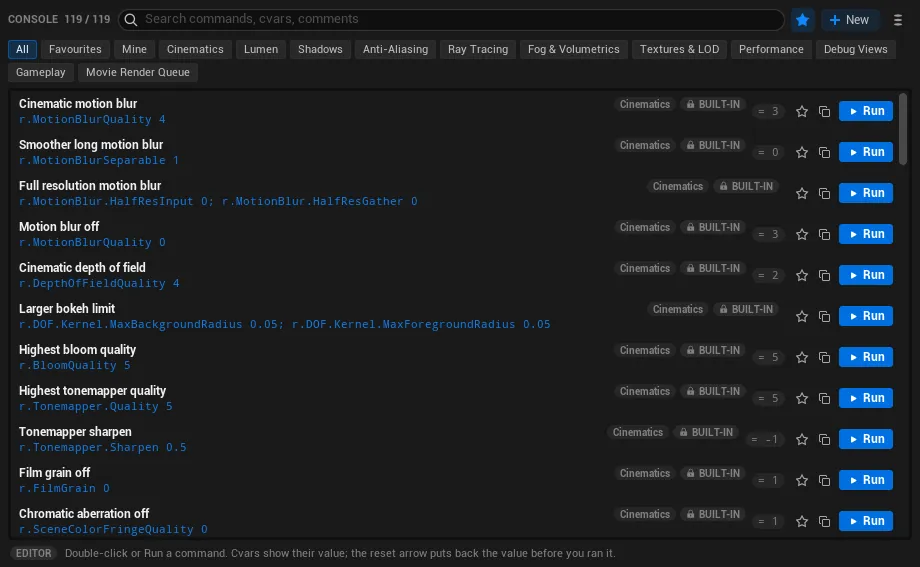
GRADE Studio's Console panel keeps 119 ready-made engine commands and variables (cinematics, Lumen, shadows, anti-aliasing, performance, debug views, gameplay, Movie Render Queue) and your own, one click away. See Console library.
Related engine variables:
| Variable | Why it matters for GRADE |
|---|---|
r.HDR.EnableHDROutput, r.HDR.Display.OutputDevice | The GRADE tonemapper's Output Auto follows them. |
r.Tonemapper.Quality, r.TonemapperGamma | Affect the engine tonemapper only, not GRADE's when it overrides. |
stat gpu | Shows GRADE's GPU passes. |