GRADE Manual
GRADE - Pro Post-Process & Photo Studio turns the Unreal Editor into a photo editor for your level. You grade the scene live, the way you would in a professional photo editor or colour-grading suite, and the level viewport, Play In Editor and packaged games all update at once.
GRADE can also photograph the scene from fixed angles over time, render your sequences with Movie Render Queue, light your models with a studio environment painted from light shapes, and edit renders and photos without leaving Unreal.
Version 1.0.0 for Unreal Engine 5.8, by LIDA Tools. Press F1 in GRADE Studio to open this manual in its own window.
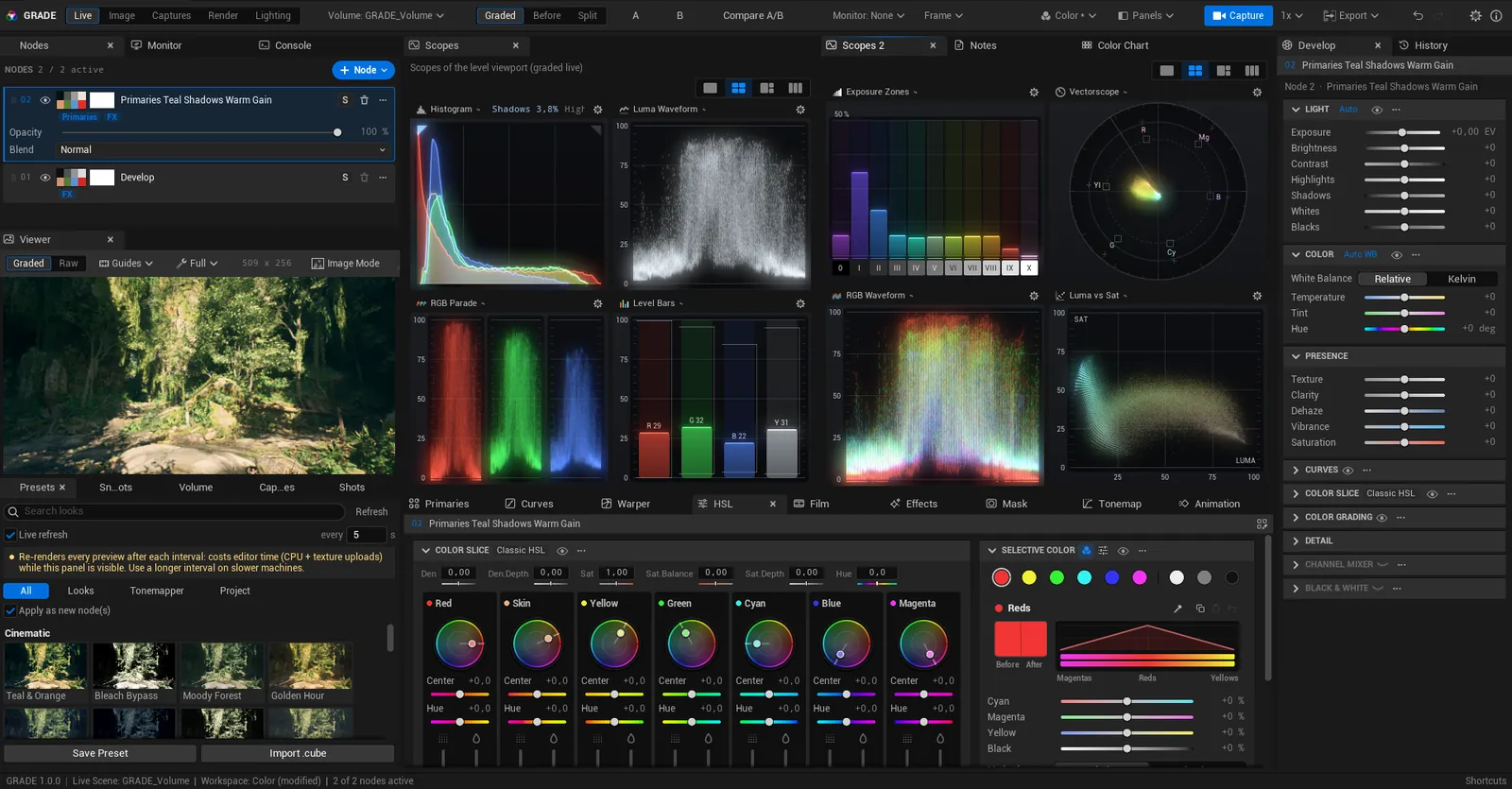
Start here
- Getting Started: install, the five concepts, your first grade in ten minutes.
- GRADE Studio: a tour of every panel, workspace and shortcut.
- Live Grading: volumes, presets, layers, blend modes, how effects combine, effect order.
Contents
| Page | What it covers |
|---|---|
| Getting Started | Requirements, installation, concepts, first grade, showcase map |
| GRADE Studio | The start-up splash, GRADE Settings (accent colour, splash, shortcuts), modes, top bar, icons, a top bar that never wraps, workspaces with your own names and icons, every panel (Nodes, Presets, Snapshots, Volume with its Appearance section, Volumetrics, Shots, Viewer, Scopes, Monitor, Captures, tool panels, History & Log, Notes with its reference canvas, the Console library of 119 commands), the Captures and Render pages, what happens when the viewport pauses, the manual window, About, workspaces, gestures, rebindable shortcuts and panel keys, layout editing |
| Live Grading | GRADE Volumes (with their viewport colour and label), shot grading (a look per camera / cut), presets and looks, layers, blend modes, how layers compute, how effects blend, effect order, frame overlays and guides, letterbox, pulses |
| Colour Tools | Develop, Kelvin white balance, Color Management, Primaries and Log wheels, HDR Zones, HSL, Color Slice, curves, hue curves, levels, colour balance, Selective Color (and how it differs from Color Slice), colour replace, warper, channel mixer, black & white, gradient map, photo filter, colour science, film emulation, LUT, auto and match |
| Masks | Mask stacks (Add, Subtract, Intersect, Difference), density, feather, expand and clipping masks; 2D masks; scene masks (Objects / Actors, Surface Direction, Edges / Facing, Light & Shadow, Motion, Depth, Height, Sky, Noise, World Shape); live painted masks without textures; effect masks |
| Effects | All 92 effects by category, with key parameters and tips: per-effect opacity, remove several effects with one drag, Denoise (Basic and Advanced), Kuwahara styles (Anisotropic, Classic, Circular, Combo), AAA ambient occlusion (VBAO), Cavity, Screen Space Bevel (rounded bands), Camera Shake, Lens Bloom, Bloom styles (anime, CRT, ocular glare), Underwater, glitch layers, custom textures, scene effects |
| Fog Gradient | Depth and height fog with a Near / Mid / Far colour gradient, sky and sun glow, five mood presets, optional volumetric banks and light shafts, cost |
| Aurora | Volumetric northern lights in the sky: six shapes (Curtains, Arc, Corona, Spiral, Pulsating, Custom), six palettes, placement, motion, stars, sky-only compositing, cost per quality, four looks |
| Painted World | Hand-made illustration renderer: Watercolor Illustration, Ink & Wash, Gouache and Sumi-e on Silk styles, brush by depth, washes, paper, ink contours, cost |
| Anime Painted | Hand-painted anime backgrounds with season palettes (Summer, Spring, Golden Field, Autumn, Sakura, Winter, Custom), Set Anime Season from Blueprint, cel-only stencil |
| Oil Paint | Oil painting with brush strokes anchored to the world, depth-aware Kuwahara paint, flow, impasto and canvas, five styles, debug views, cost; Painterly as a painting on canvas |
| Comic Ink | Hand-inked comic: variable-width outlines with wobble, cel shading, world-anchored hatching, halftone and paper, five presets |
| Storybook | Soft hand-painted indie adventure look: painted surfaces, pencil, pastel grade, glow, light leaks, haze, four presets |
| Ghost World | "Beyond the Veil" spirit realm, seven screen transitions, Enter / Exit / Toggle Ghost World nodes, Preview switch, spirits through Custom Depth |
| Time Fracture | The scene breaking into time-shifted fragments by depth: Shatter, Depth Slices, Stutter, Echo Fragments, frame history and its memory |
| Camera Frame | Camera viewfinders and frame lines burned into the image: 15 cameras (cinema, film, broadcast, photo, phone, camcorder, action, drone, security, game photo mode, found footage, dashcam, webcam, custom), aspect ratio masks, safe areas, focus indicators, live camera data, zebras and focus peaking |
| Aspect Ratio | Letterbox / pillarbox bars for 67 formats in six families (cinema, broadcast, camera, photo, social, video games) or custom, slide-in animation, volume blending, Blueprint nodes |
| Echo Trail | Smooth ghost trails and light ribbons, static or live, from the whole view, targets, stencil, brights or a depth range, five presets, cost |
| Pixel Stretch | Compositor pixel stretch from a line, a band or a subject's edge, over the whole view or targets, row variation and glitch |
| GRADE Volumetrics | Local volumetric fog in the level: setup, the Volumetrics panel and its tabs, 21 presets and your own, fog that clings to surfaces, fog splines with animations, interactors (spheres, cones, trails, character fade), overlap events, paint mode (density and flow), quality and quality triggers, Path Traced fog, packaged games, Blueprint API, why fog is invisible |
| Ground Blend (Experimental) | The ground's material continuing smoothly onto rocks, walls and props, automatically: how the world-space ground cache works, the Ground Blend panel, settings, what counts as ground, dynamic and baked lighting, debug views, cost, limits |
| Cinema Tools, HUD and Transitions | Lens Character (anamorphic or spherical), shutter, diffusion, lens optics, relight, volumetric haze, lens flare, focus modes, frequency detail, film gauges, reel damage, glow vignette, bodycam, HUD targets, transitions |
| Game Effects and Photo Mode | Player status, vision modes, weather, speed, hallucination, supernatural, diegetic UI, combat, retro consoles (vertex snapping), Stylize Pro, gameplay dynamics, frames / logo / stickers, gameplay helpers |
| Tonemapper | Operators and their fidelity, Racing Sim 2025, AgX looks, Compare operators, Post Process Volume colour grading and Film, perceptual tonemapping, scotopic vision, hue modes, gamut compression, HDR output and delivery |
| Animation, Sequencer and Gameplay | Sequencer, shots and camera cuts, Blend To Preset, pulses, camera shake, Blueprint API, transitions and HUD from Blueprint, game effect helpers |
| Captures | The Captures page and its dockable panels, resolutions (Viewport, 1K, 2K, 4K, 8K, Custom) and their limits, the settings tabs (Output, Quality, Schedule, Point, Export), the Screenshot button and its quality presets, recent captures with filters and Copy Image, the Capture Preview, capture points, Capture All, timelapse, progress viewer, GIF / MP4 export, runtime captures |
| Render | Movie Render Queue inside GRADE Studio: enabling the plugin, queue and shots, output and file name tokens, extra outputs (burn-in, UI, Timeline XML (.fcpxml), command line encoder), quality presets (Draft to Path Tracer), render passes and stencil layers, OpenColorIO, tiling, console variables, your look in renders, live preview with a playback timeline, statistics cards, history playback, presets, limits |
| Lighting | Studio lighting from light shapes on the sky sphere: dockable panels, 55 setup presets by category, the environment panorama (display modes, Display Offset, environment EV and rotation, bloom, hover readout) and its gestures, lights list, shape types and blend modes, every property, fills (gradients, LED panels, screens, grids, IES light profiles, images) and fill presets, custom bezier shapes and the Shape Editor, base HDRI, horizon, Sky Light output, Update While Dragging, Live Values, the History panel, the visible backdrop, the Analysis board and Color Chart panels, light cards (with their rotation), studio stages and Studio Setups, the plugin content and packaged games, Bake Cubemap, Export EXR / HDR, Place by Reflection, shortcuts, automotive / product tips, troubleshooting |
| Image Editing | Grading textures, renders and photos |
| Scopes and Monitoring | Reading each scope, nits scale, HDR scopes with real HDR data, CIE xy / u'v' chromaticity and out-of-gamut highlight, false colour, zebra, clipping, HDR overlays, the Color Chart panel (a virtual reference chart through your grade), viewport notices, colour vision simulation and the in-game accessibility filter |
| LUTs | .cube import and export, Unreal LUT strips |
| Export to Post Process Volume | Shipping a look without the GRADE runtime |
| Performance | What costs what, measuring, grade.Quality, good habits |
| Console Variables | grade.Enabled, grade.Quality and related engine variables |
| Troubleshooting | Common problems and their fixes grouped by area, refreshing the manual's screenshots, testing and release (the GRADE smoke test, packaging) |
| FAQ | Short answers to common questions |
| Changelog | Release notes: what each version adds, changes and fixes |
| Parameter Reference | Every setting with its range, default, tooltip and Blueprint path (generated from the C++ headers), and the Blueprint API |
Features at a glance
- Live grading with GRADE Volumes. Unbound volumes grade the whole level; box volumes blend in by distance and stack by priority. Each volume holds any number of non-destructive layers with 16 blend modes, opacity and masks.
- A complete colour stage in every layer, baked into a LUT (no GPU cost):
- Photographic Develop controls: light, colour, presence; white balance as Temperature / Tint or in Kelvin with chromatic adaptation and an eyedropper.
- Color Management per layer: ACEScct, Camera Log A, Camera Log B or Film Log grading spaces in AP1, Rec.2020, P3, Camera Wide Gamut A or Camera Wide Gamut B working gamuts.
- Grading-suite primaries, Log wheels, HDR zone wheels (scene-referred in live views: true stops before the tonemapper, light above paper white included), Color Slice and a color warper.
- RGB curves, hue curves, levels, colour balance, selective colour, colour replace, channel mixer, black & white, gradient map, photo filter, colour science, film emulation and a creative LUT.
- Shot grading: a look per camera or per Sequencer cut, on top of the volumes or instead of them, blended on cuts.
- Masks like a photo editor, aware of the 3D scene: a mask stack per node (Add, Subtract, Intersect, Difference, opacity), density, feather, expand and clipping masks; linear, radial, luminance and colour range masks; scene masks that select actors of the level, surfaces facing a direction, object edges, light and shadow, motion, depth, height, sky and procedural noise; world shape masks (tracked power windows that follow an actor or a bone); masks painted live in the level viewport or on the image, with no texture and no Apply step.
- 92 effects in nine categories, each with its own opacity next to its name: scene (Visibility Bitmask AO with temporal denoise, cavity, screen space bevel, atmosphere, sun shafts, underwater, relight, haze, volumetric aurora, fog gradient, weather), cinema (Lens Bloom, bokeh DOF, halation, anamorphic or spherical lens character, diffusion, flares, camera shake, shutter), lens, detail (Denoise of speckle, fireflies and grain that keeps the detail, sharpen, clarity, painterly, Kuwahara in four styles), stylized (Painted World watercolour / ink / gouache / sumi-e, Anime Painted with season palettes, world-anchored Oil Paint, Comic Ink, Storybook), games, gameplay (player status, vision modes, combat, speed, sanity, Ghost World, Time Fracture, supernatural), media and glitch (VHS, CRT, codecs, film damage, grain), HUD and transitions (bodycam, HUD targets and censoring, diegetic UI, photo frames, camera viewfinders and frame lines, aspect ratio bars, echo trails, pixel stretch, camera transitions). Custom effect order inside each stage.
- GRADE Volumetrics: local volumetric fog volumes and fog splines lit and shadowed by the level, 21 presets and your own, noise and wind, fog that clings to surfaces, interactors that carve it (spheres, flashlight cones, trails, character fade), painted density and flow, quality triggers, Path Traced fog for path traced renders.
- Ground Blend (experimental): the ground's material continues smoothly up onto the objects that stand on it, from a cheap world-space ground cache, world-stable, lit by dynamic and baked lighting, with no material setup.
- GRADE tonemapper with 15 operators (ACES, ACES 2.0, AgX with its standard looks, Khronos PBR Neutral, Unreal Filmic, Perceptual OKLab, Racing Sim 2025, Hejl-Burgess-Dawson...), a live Compare operators gallery, the Post Process Volume colour grading and Film curve kept on request, scotopic vision, perceptual exposure and HDR10 / HLG / scRGB output with HDR monitoring.
- 273 built-in looks in 20 groups, and your own GRADE Presets.
- Animation: Sequencer trims and look blends, Blend To Preset, gameplay pulses, one-node gameplay helpers and a complete camera shake system (presets, layered Wave / Perlin / Curve shakes, Blueprint and Sequencer).
- Scopes and monitoring: waveforms (percent or nits, real HDR data on a PQ axis for HDR10 / scRGB), parade, vectorscope, histogram, CIE xy / u'v' chromaticity with out-of-gamut highlight; false colour, zebra, clipping, HDR nits.
- Accessibility: colour vision simulation in the viewport and an in-game filter for colour-blind players.
- Captures: capture points, Capture All, timelapse, progress viewer, GIF / MP4, exact resolutions (Viewport, 1K, 2K, 4K, 8K or Custom), a Screenshot button with quality presets (Draft to Cinematic), a Capture Preview, Copy Image, the real image size in the metadata, a Captures page of dockable panels with settings tabs.
- Render: Movie Render Queue inside GRADE Studio, with your look in every frame: queue with shots, output with file name tokens, PNG / JPG / 16-bit EXR / BMP / MP4 and multi-layer EXR, burn-in, Timeline XML (.fcpxml), command line encoding, render passes and stencil layers, OpenColorIO, quality presets from Draft to Path Tracer, console variables, a live preview with a playback timeline, a state-coloured progress bar with statistics cards, history playback and render presets, all in dockable panels.
- Lighting: a studio environment painted from softboxes, strips, rings, gradient bands, a sun and custom bezier shapes on the sky sphere, over an optional HDRI, lighting and reflecting through the Sky Light (no extra light actors); fills (gradients, LED panels, pixel screens, softbox grids, windows, blinds, IES light profiles, images), 55 presets, light cards placed in the level, five studio stages and 14 Studio Setups, an Analysis board and a 24-patch Color Chart, a History panel of the Lighting edits, Live Values, a visible backdrop, Place by Reflection, live update while dragging, Bake Cubemap for play and packaged games, EXR / HDR export.
- Color Chart in Live and Image: a virtual 24-patch reference chart measured through your grade (match % and colour difference per patch), no chart in the scene needed.
- Console library: 119 ready-made console commands in 11 categories and your own with a comment; run, star, copy and reset a variable to its previous value.
- Image mode: grade textures, renders and photos with the same tools.
- Exports:
.cubeLUTs, Unreal LUT strips, GRADE Presets and native Post Process Volumes. - In the editor: GRADE Settings (engine or custom accent colour, splash, shortcuts), rebindable shortcuts that never take the editor's own, a short splash that shows the real loading steps, a single clear notice when the level viewport pauses (with the button that fixes it), dockable workspaces, a history that shows the values each edit changed (repeated steps grouped), a log, this manual in its own window (grouped contents with icons, a filter, favourites and colours, pictures of the panels) and notes with a rich-text page and an infinite reference canvas (snapping, smooth brush, text and sticky note colours).
Modules
| Module | Type | Contents |
|---|---|---|
GradeRuntime | Runtime | Volumes, GRADE Fog Volume / Fog Spline / Fog Quality Trigger actors and the GRADE Fog Interactor component, GRADE Lighting, GRADE Light Card and GRADE Studio Stage actors, the GRADE Ground Blend actor (experimental, with its own scene view extension and ground cache), GRADE Shot and GRADE Tracker components, renderer (scene view extension), tonemapper, pulses, camera shakes, LUTs, scopes, looks, capture library, image processor |
GradeEditor | Editor | GRADE Studio, Volumetrics panel and fog paint mode, Ground Blend panel, capture manager and timelapse, Render page (Movie Render Queue front-end, no link dependency), Lighting page (live environment, bake, export), console library, .cube importer, mask painter, Post Process Volume export |
Support
- Documentation: this manual, built into the plugin (F1 in GRADE Studio).
- Support: support@lidatools.com (also in About GRADE Studio, the "i" button at the right end of the top bar).
- Bug reports: bugs@lidatools.com. Licensing and invoices: licensing@lidatools.com. Website and online manual: https://www.lidatools.com (also in About GRADE Studio).
- When you report a problem, include the Unreal version, the steps to reproduce it and the lines of the Log panel (log category
LogGrade).